


Polymarket Copy Trading: A Step-by-Step Guide with Automations
Learn how to automatically copy trades from the best Polymarket traders using PolyWatchDog's automation builder — from picking traders to setting position sizing.
Most of the alpha on Polymarket happens while you're asleep. A well-connected wallet quietly loads up on a mid-cap political contract at 3am, the news breaks at 9am, and by the time you check your phone the move is over. If you want to ride those trades without sitting in front of a screen all day, you need a robot — something that watches the order flow, decides what to mirror, and places the order for you.
That's what PolyWatchDog's Automations are. Think of it as n8n or Zapier, but every trigger, condition, and action is built around Polymarket. In this guide we'll build two real automations end-to-end: one that follows a specific trader you already trust, and a more speculative one that hunts for new wallets placing big bets in a category you care about.
The builder, at a glance
Open Automations → New from the sidebar and you land in a visual canvas. Three panels:
- Left — a palette of nodes grouped into Triggers, Conditions, and Actions.
- Center — a canvas where you drag nodes and connect them.
- Right — a config panel that opens when you click a node.
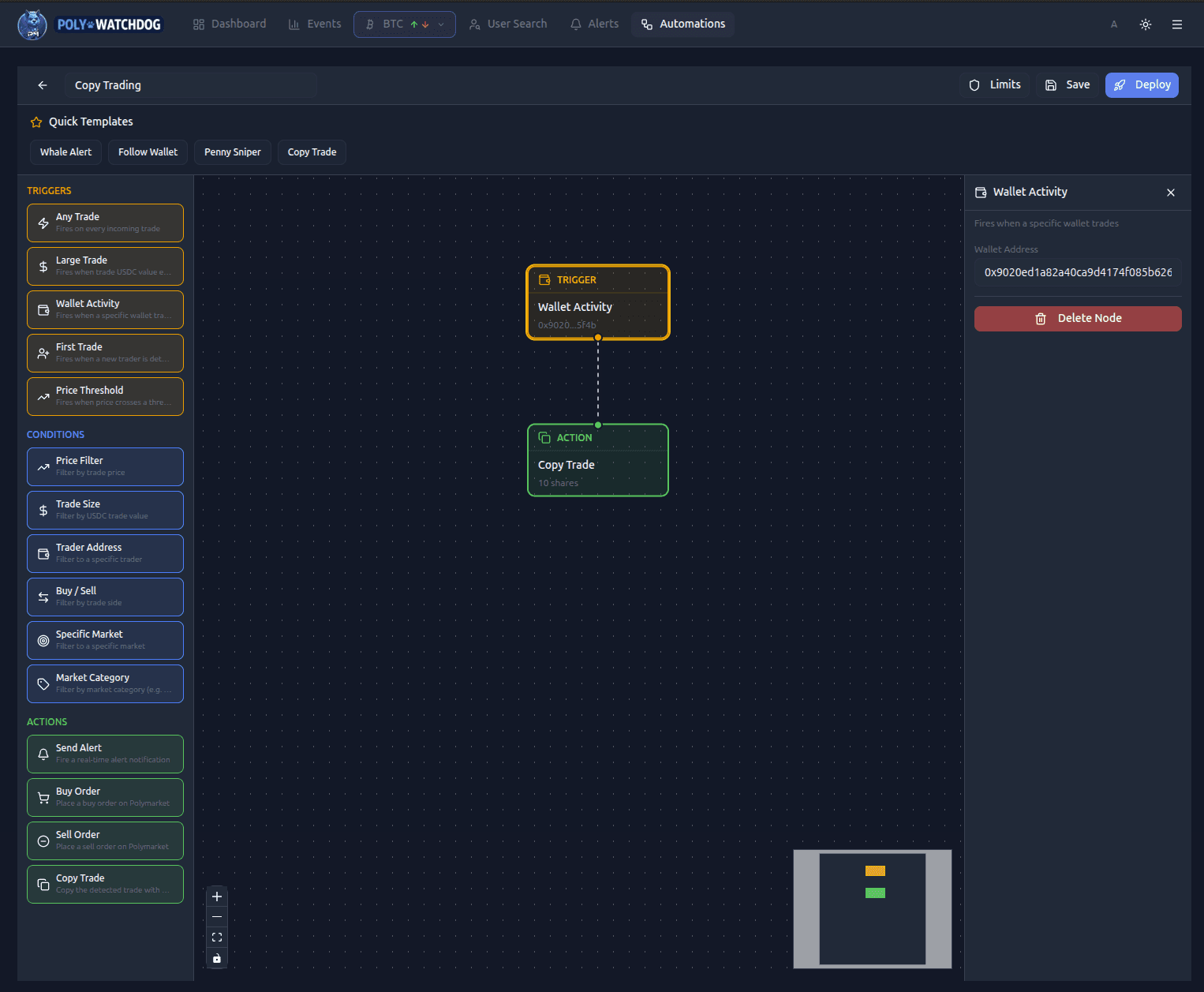
Every automation follows the same shape: exactly one trigger → zero or more conditions → one or more actions. The trigger fires on live Polymarket activity, the conditions narrow it down, and the actions do something — place an order, send an alert, or both.
Scenario 1 — Copying a trader you already know
Let's say you follow a wallet on Twitter that has a great track record on election markets. You want to mirror their buys automatically, but only when they go in with real size (anything under $1,000 is probably noise).
Step 1 — Drop the trigger
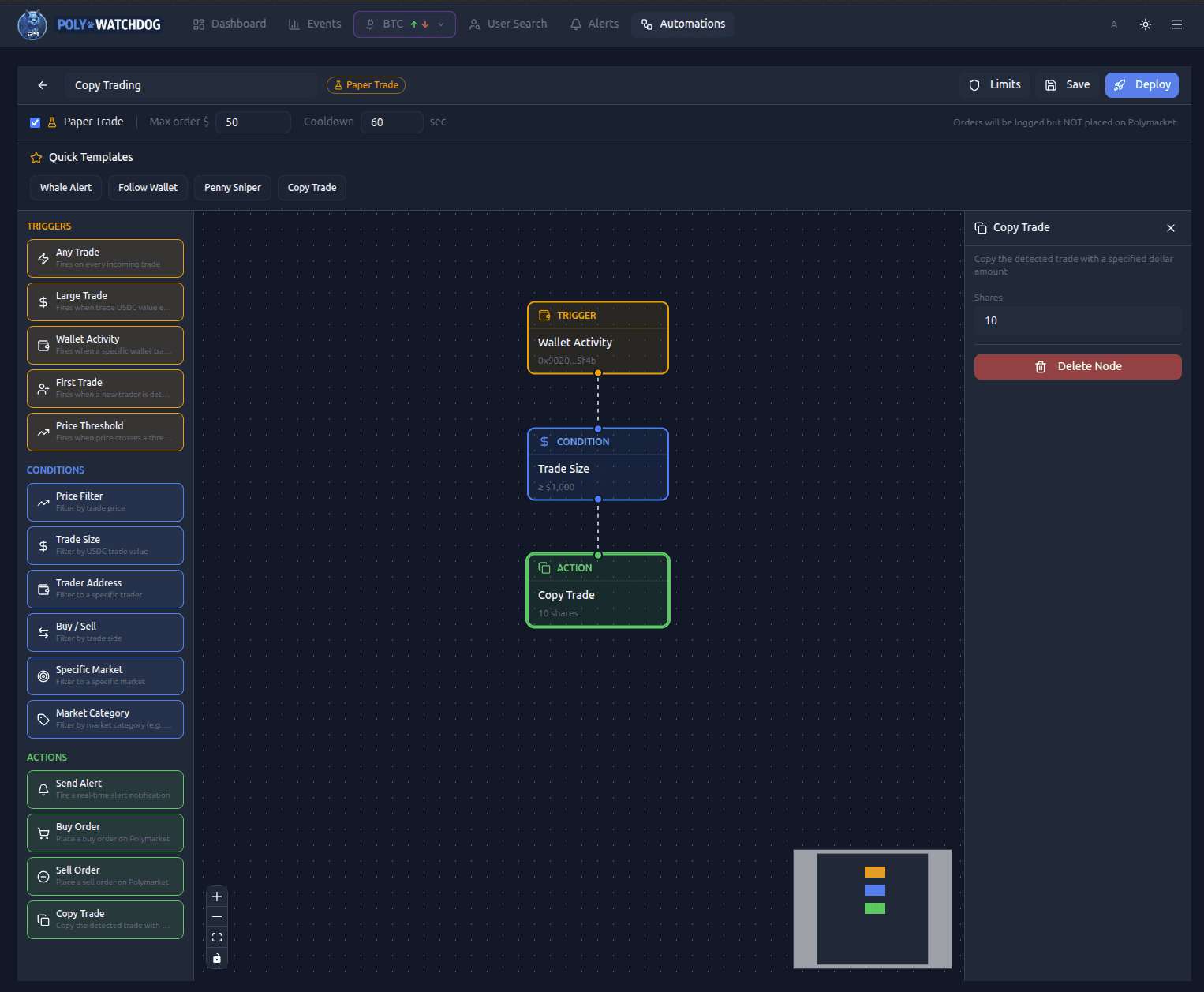
Drag Wallet Activity from the palette onto the canvas. In the right panel, paste the 0x… address of the wallet you want to follow.
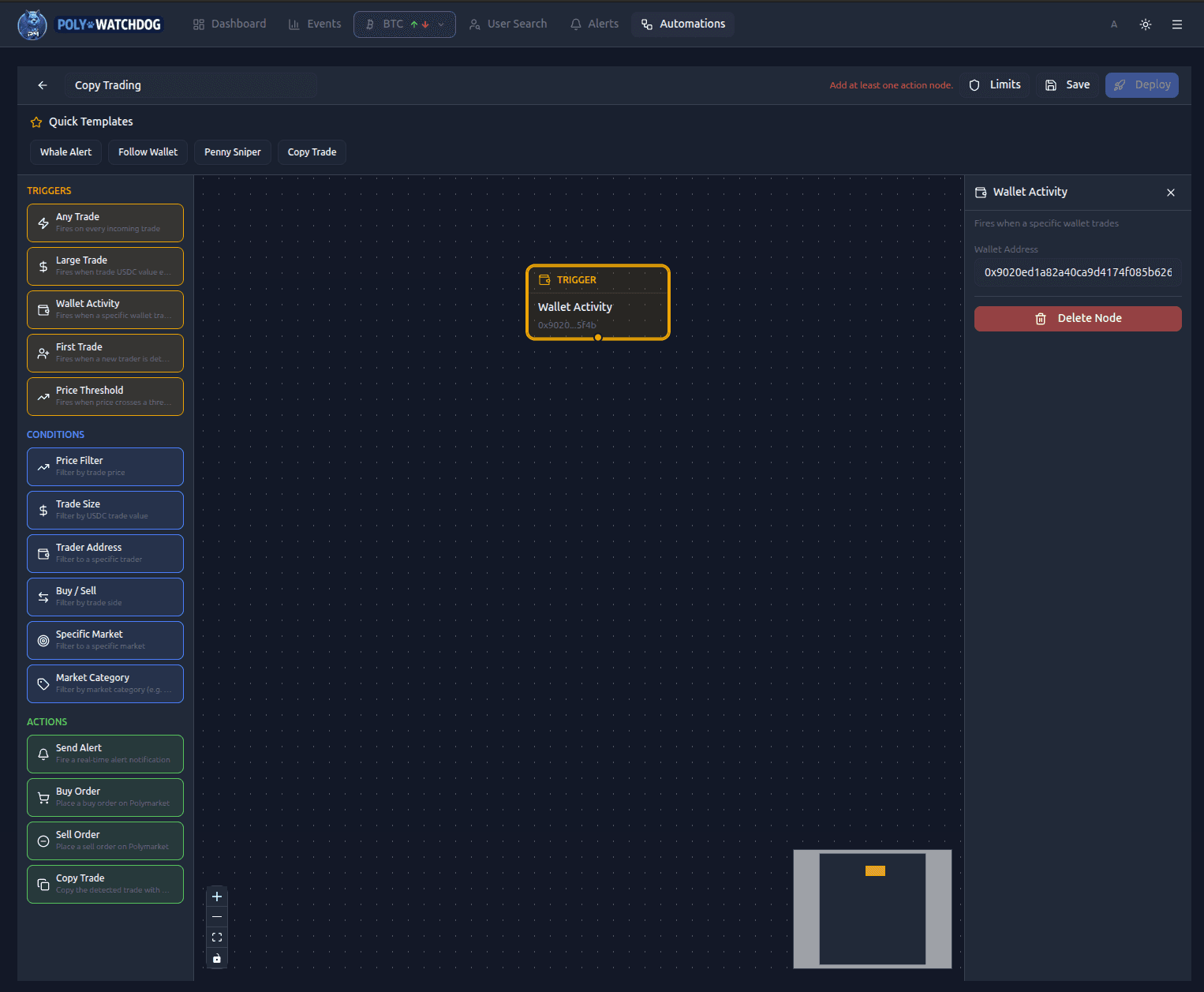
This trigger fires every time that specific wallet executes any trade — buys, sells, yes-side, no-side.
Step 2 — Filter with a condition
You don't want to copy every dust trade. Drag a Trade Size condition under the trigger and connect them. Set it to ≥ $1000.
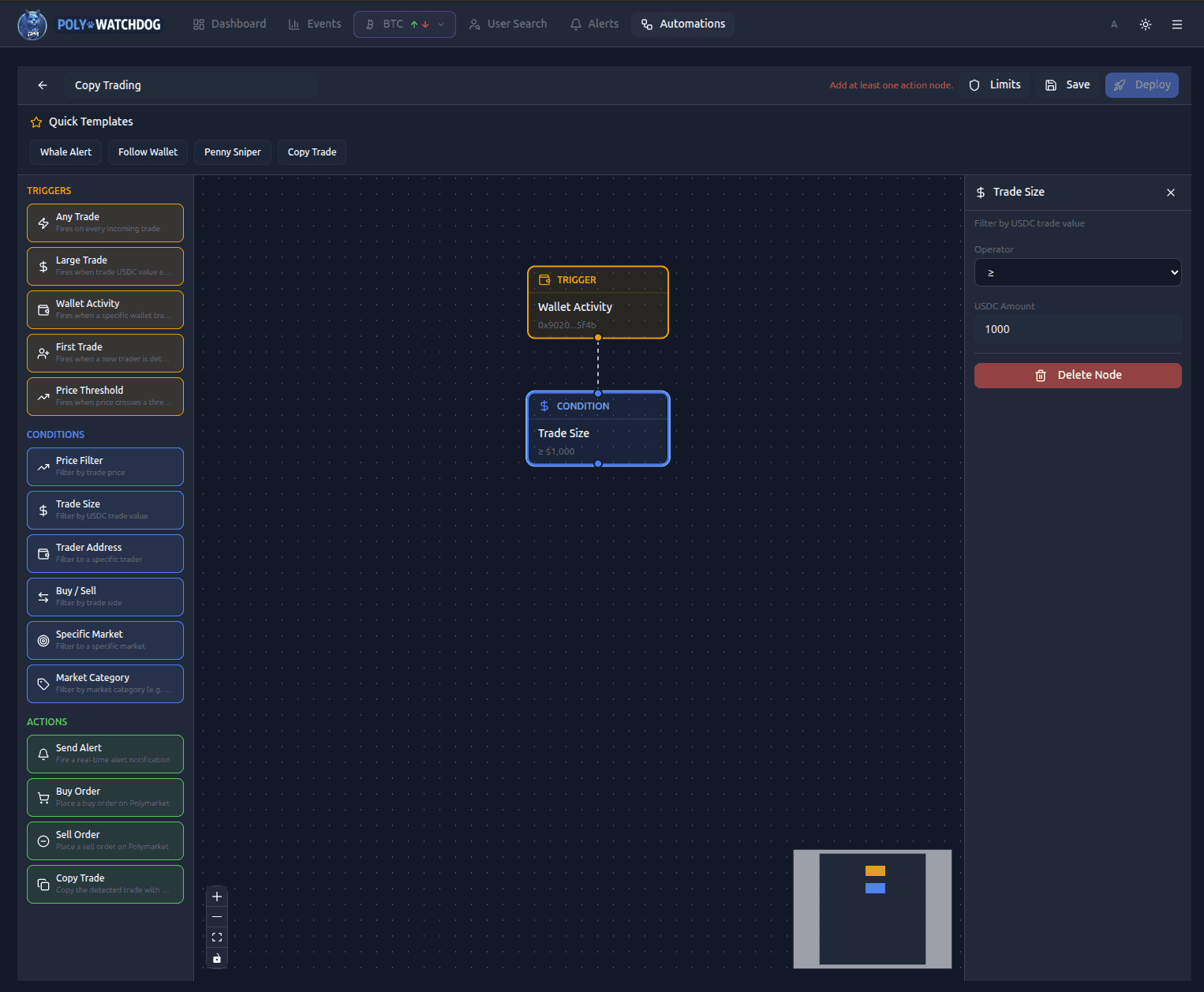
If you want to be stricter — maybe only buys, not sells — chain a Buy / Sell condition after it and set it to Buy. Conditions are AND-gated: every connected condition must pass.
Step 3 — Add the copy-trade action
Drag Copy Trade onto the canvas and connect it after the last condition. In the config panel, set the dollar amount you want to commit per trade. If the wallet buys $50,000 of a market, your automation will place its own much smaller buy on the same token at the same price.
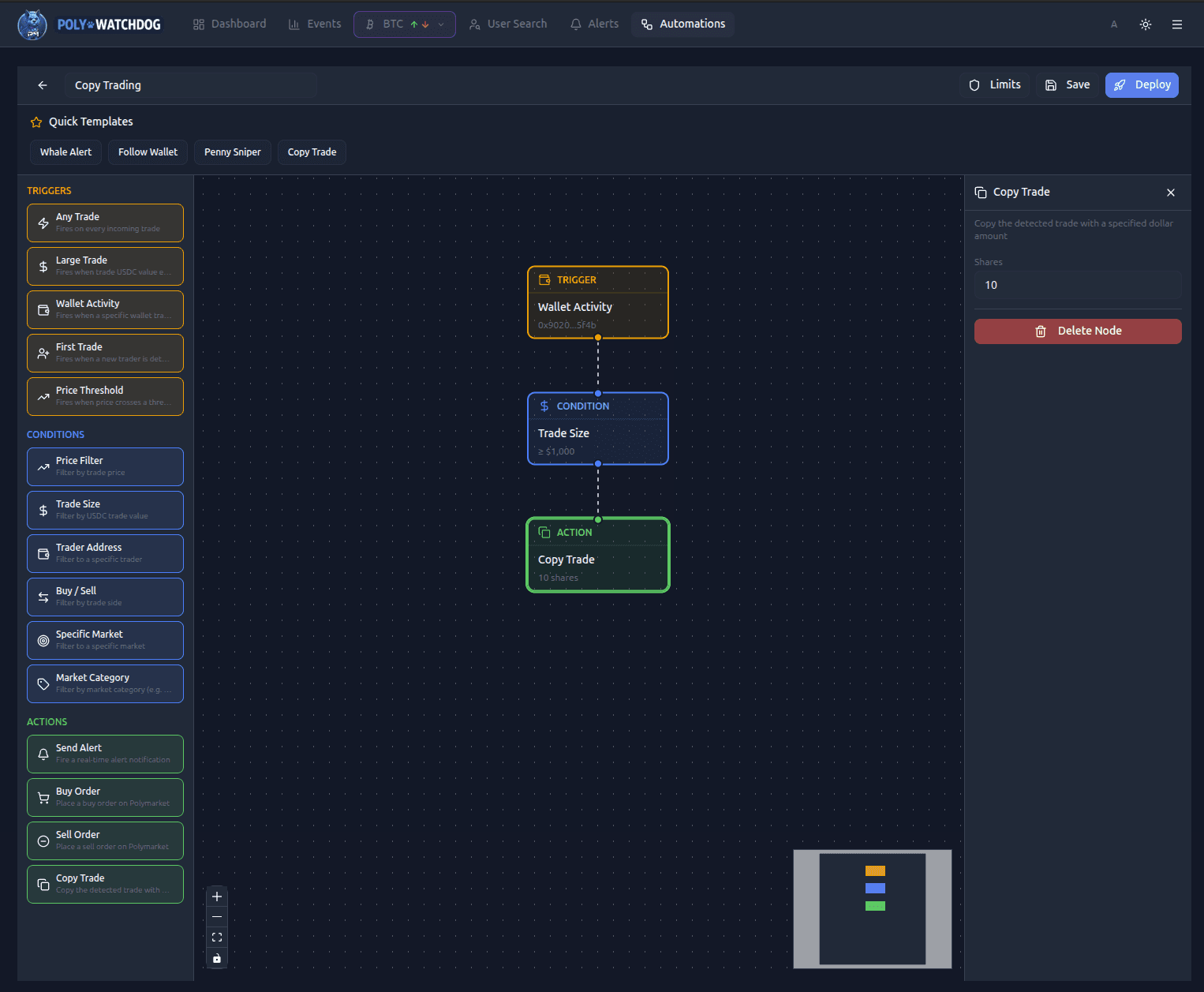
The copy action automatically matches the side (YES/NO, buy/sell) and uses the detected trade's price as a limit, so you won't chase into a pump if the market has already moved by the time the order lands.
Step 4 — Set your safety rails
Click Limits in the top toolbar. Three things matter here:
- Paper Trade — on by default. Leave it on for the first 24–48 hours so you can watch what your automation would have done without risking real USDC.
- Max order $ — a hard cap per execution. Even if you fat-finger a $500 copy amount, this stops it.
- Cooldown — minimum seconds between executions. Set it high enough that a flurry of trades from the same wallet can't drain your account.
Step 5 — Save, then Deploy
Save stores the automation as a draft. Deploy activates it — from that moment on, the trigger is live against the real-time feed. You can pause or edit any time.
Scenario 2 — Discovering traders you don't know yet
The more interesting pattern is the inverse: you don't pick a wallet, you let the automation pick it for you. This is the "find new smart money" play.
Swap the trigger for First Trade — it fires the moment a wallet the system has never seen before executes its first trade. On its own, that's too noisy to be useful (most first-trade wallets are retail depositing $20 for fun). The magic is in the conditions you stack on top:
- Market Category =
Politics(orCrypto,Elections,Economy— whatever you have conviction in). - Trade Size ≥
$5,000— a brand-new wallet opening with five figures is either a whale moving to a fresh address or an insider. - Optionally, Price Filter
≤ 0.30— you want to catch them loading up on contrarian longshots, not rounding out a 95¢ favorite.
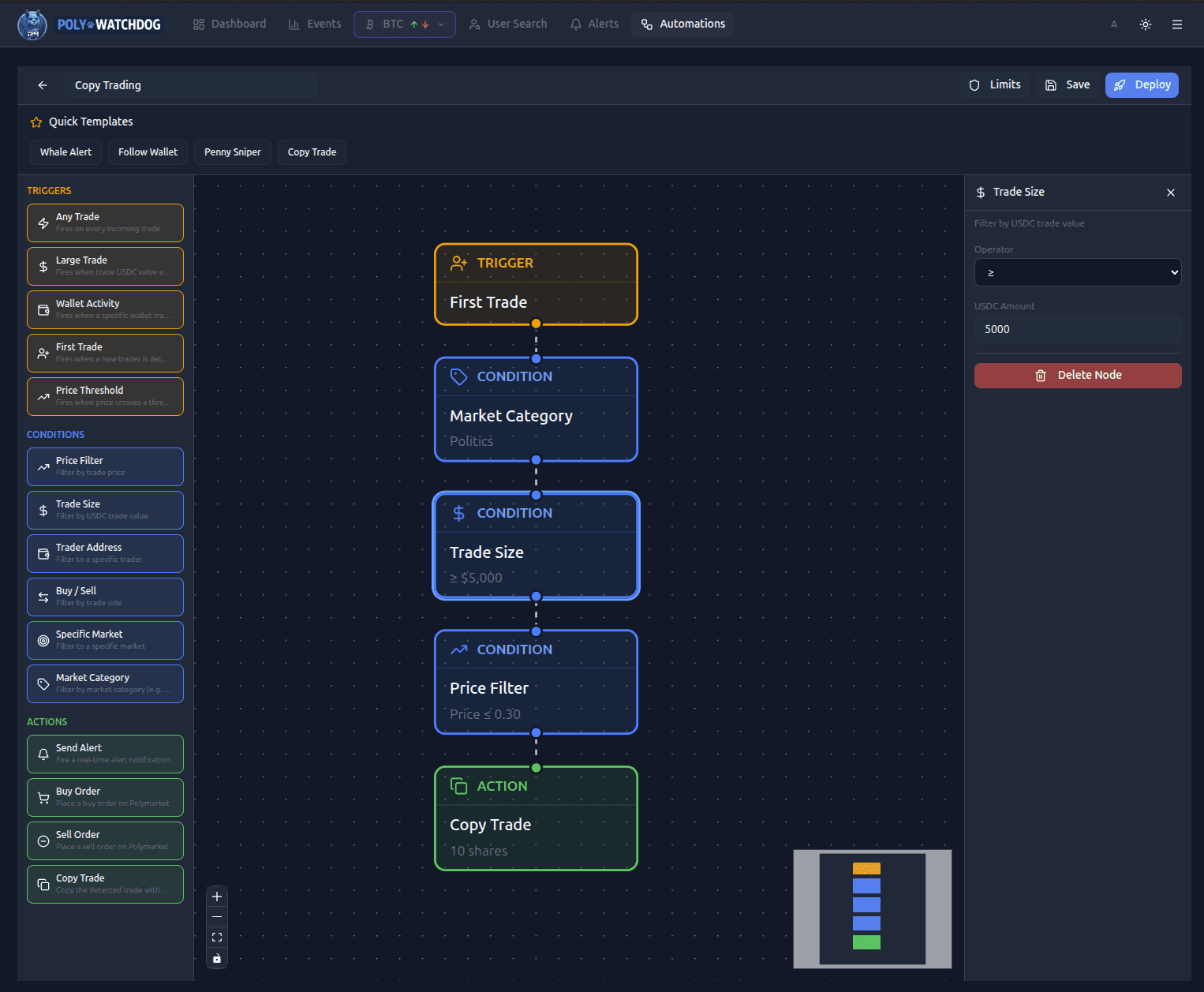
Finish with a Copy Trade action at a modest size — since you have no prior knowledge of this wallet, treat every hit as a speculative entry. Keep the cooldown high and the max order small.
What you'll get: a trickle of alerts and positions opened against wallets you've never heard of, many of which will look like nothing, and a handful of which will turn out to be very well-informed. The signal-to-noise rises dramatically once you tighten the category and size filters to a segment you understand.
If you'd rather watch before you copy, swap the Copy Trade action for Send Alert and review the trades in your notifications for a week first. Once you see the pattern you like, flip the action back.
A few things to know before you deploy
- Paper Trade first. It costs nothing and will show you every false-positive in your filter before you're paying for them in USDC.
- Your daily cap is real. Aside from the per-strategy
Max order $, your account has a daily spending cap that sits across every automation you run. Automation executions stop quietly once it's hit. - Copy-trade amount is dollars, not shares. The UI field is a USDC figure — whatever you enter there is roughly what you're committing per trigger event.
- You still need credentials. Copy-trade actions execute via the Polymarket CLOB using your configured keys. Orders won't fire if your credentials aren't set up — alerts will still fire in any case.
Wrapping up
Copy trading on Polymarket used to mean staring at a wallet's activity page and hoping to click buy before the price moved. Now it's a five-node flow you build in under a minute and let run in the background. Start with the tight version — one wallet, one condition, paper-trade on — and expand once you trust what it's doing.
If you've built something that works and you want to share it, drop us a note. We're collecting community automations to ship as starter templates, alongside the built-in Whale Alert, Follow Wallet, Penny Sniper, and Copy Trade ones already in the template bar.